找回密码
 注册

Sign in with Twitter

It's what's happening?

微信登录

微信扫一扫,快速登录

查看: 213|回复: 0

【AI应用开发捷径之路】第三课:文生图、文生视频、文生声音、多模态,如何选择合适的大模型?如何在SpringAI中应用这四种技术

[复制链接]
发表于 2025-12-5 04:18 | 显示全部楼层 |阅读模式

马上注册,结交更多好友,享用更多功能,让你轻松玩转社区。

您需要 登录 才可以下载或查看,没有账号?注册 微信登录

×
作者:微信文章
前言


文生图、文生视频、文生声音、多模态这些AI生成技术虽然都涉及“输入文字生成内容”,但在技术原理、输出形态和应用场景上有本质区别。下面通过一个对比表格让你快速了解它们的核心差异:

w1.jpg

简单来说:

    文生图、文生视频、文生声音 是生成式技术,目标是创造新的单一形式内容(图、视频、声音)。

    多模态 是理解与推理技术,目标是连接、理解和处理不同形式的信息。
🌟 核心区别深入解读


    文生图:技术最成熟,应用最广泛。关键在于对空间、构图和风格的理解与控制。

    文生视频:技术前沿,挑战最大。不仅要保证单帧质量,更要确保帧与帧之间的时序连贯性和逻辑合理,难度呈指数级上升。

    文生声音:

      语音合成:高度拟人化,注重音色、情感和节奏。

      音乐生成:涉及旋律、和声、配器等复杂音乐理论。

    多模态:这是“大脑”和“桥梁”。它本身不直接生成精美的图片或视频,而是让AI能看懂图、听懂话,并基于此进行推理、对话或调用专门的生成工具。例如,你可以给多模态AI上传一张照片,让它描述内容,再根据描述生成一个新的故事或图片。
🎯 如何选择使用场景?


    你需要一张宣传海报、插画或产品概念图 → 选择文生图。

    你需要一段几秒到几十秒的创意短视频、动画片段 → 关注文生视频。

    你需要为视频配音、创作一段背景音乐或生成特殊音效 → 使用文生声音。

    你需要一个能看懂你上传的文档、图表,并能与你深入讨论的智能助手 → 依赖多模态AI。
💡 融合应用是趋势

在实际应用中,这些技术常被结合使用,形成一个创作闭环。例如:

    用多模态AI分析一份产品报告,提炼核心卖点。

    用文生图根据卖点生成一系列产品概念图。

    用文生视频将概念图转化为动态广告短片。

    用文生声音为短片生成解说配音和背景音乐。


如何在SpringAI中应用这四种技术


1. 引入BOM进行版本管理

首先,在你的pom.xml的 <dependencyManagement> 部分引入Spring AI的BOM。

强烈推荐使用当时最新的稳定版本。
   <dependencyManagement>
        <dependencies>
            <dependency>
                <groupId>com.alibaba.cloud.ai</groupId>
                <artifactId>spring-ai-alibaba-bom</artifactId>
                <version>1.0.0.2</version>
                <type>pom</type>
                <scope>import</scope>
            </dependency>
        </dependencies>
    </dependencyManagement>

引入BOM后,在添加其他Spring AI组件依赖时就可以省略<version>标签了,所有版本都由BOM统一管理。


2. 添加模型Starter依赖

接下来,在<dependencies>部分添加你所需模型的Starter:

    <dependency>
      <groupId>com.alibaba.cloud.ai</groupId>
      <artifactId>spring-ai-alibaba-starter-dashscope</artifactId>
    </dependency>


3.配置文件

依赖添加完成后,你需要在

application.yml 或 application.properties 中进行配置。

spring:
  ai:
    dashscope:
      api-key: sk-XXXXXX
      chat:
          options:
              model: qwen-plus
api-key可以通过官网注册获取:https://bailian.console.aliyun.com/

4.测试

①阻断性返回测试

package com.example;

import cn.myeasyai.FaceApplication;
import com.alibaba.cloud.ai.dashscope.chat.DashScopeChatModel;
import org.junit.jupiter.api.Test;
import org.springframework.ai.chat.model.ChatResponse;
import org.springframework.ai.chat.prompt.Prompt;
import org.springframework.beans.factory.annotation.Autowired;
import org.springframework.boot.test.context.SpringBootTest;

@SpringBootTest(classes = FaceApplication.class)
public class TestQwen {

    @Test
    public void testQwen(@Autowired DashScopeChatModel dashScopeChatModel) {
        ChatResponse call = dashScopeChatModel.call(new Prompt("您好,你是谁"));
        String text = call.getResult().getOutput().getText();
        System.out.println(text);
    }

}

w2.jpg
②流式返回测试

package com.example;

import cn.myeasyai.FaceApplication;
import org.junit.jupiter.api.Test;
import org.springframework.ai.deepseek.DeepSeekChatModel;
import org.springframework.beans.factory.annotation.Autowired;
import org.springframework.boot.test.context.SpringBootTest;
import reactor.core.publisher.Flux;

@SpringBootTest(classes = FaceApplication.class)
public class TestDeepseek {
    /**
     * 测试流式
     * @param deepSeekChatModel
     */
    @Test
    public void testDeepseekStream(@Autowired DeepSeekChatModel deepSeekChatModel) {
        Flux<String> stream = deepSeekChatModel.stream("你好,你是谁");
        stream.toIterable().forEach(System.out::println);
    }

}
w3.jpg

5.文生图

package com.example;

import cn.myeasyai.FaceApplication;
import com.alibaba.cloud.ai.dashscope.image.DashScopeImageModel;
import com.alibaba.cloud.ai.dashscope.image.DashScopeImageOptions;
import org.junit.jupiter.api.Test;
import org.springframework.ai.image.ImagePrompt;
import org.springframework.ai.image.ImageResponse;
import org.springframework.beans.factory.annotation.Autowired;
import org.springframework.boot.test.context.SpringBootTest;

/**
* @author: yabushan
* @date: 2025/12/01
* @description: 测试阿里模型多模态
*/
@SpringBootTest(classes = FaceApplication.class)
public class TestAliModel {

    /**
     * 文生图
     * @param dashScopeImageModel
     *a cat:  一只猫
     */
  @Test
    public void  text2Img(@Autowired  DashScopeImageModel dashScopeImageModel){
        DashScopeImageOptions build = DashScopeImageOptions.builder()
                .withModel("wanx2.1-t2i-turbo")//使用万象模型
                .withN(1)//生成多少张图片
                .withWidth(512)//图片的宽度
                .withHeight(512)//图片的高度
                .withMaskImageUrl("https://example.com/mask.png") //带水印的图片

                .build();

        ImageResponse aCat = dashScopeImageModel.call(new ImagePrompt("a cat", build));

        //获取图片URL
        String url = aCat.getResult().getOutput().getUrl();
        System.out.println("获取图片URL:");
        System.out.println(url);
    }

}

代码和生成效果

w4.jpg

w5.jpg
6.文生声音

package com.example;

import cn.myeasyai.FaceApplication;
import com.alibaba.cloud.ai.dashscope.audio.DashScopeSpeechSynthesisModel;
import com.alibaba.cloud.ai.dashscope.audio.DashScopeSpeechSynthesisOptions;
import com.alibaba.cloud.ai.dashscope.audio.synthesis.SpeechSynthesisPrompt;
import com.alibaba.cloud.ai.dashscope.audio.synthesis.SpeechSynthesisResponse;
import org.junit.jupiter.api.Test;
import org.springframework.beans.factory.annotation.Autowired;
import org.springframework.boot.test.context.SpringBootTest;

import java.io.File;
import java.io.FileOutputStream;

@SpringBootTest(classes = FaceApplication.class)
public class TextToSpeechTest {

    /**
     * 文生语音 - 基础示例
     * https://help.aliyun.com/zh/model-studio/cosyvoice-voice-list?spm=a2c4g.11186623.help-menu-2400256.d_2_6_0_9.50c45a35PMcZgx&scm=20140722.H_2997333._.OR_help-T_cn~zh-V_1
     */
    @Test
    public void textToAudioBasic(@Autowired DashScopeSpeechSynthesisModel speechSynthesisModel) {
        try {
            System.out.println("=== 阿里百炼语音合成测试 ===");
            // 1. 构建语音合成选项
            DashScopeSpeechSynthesisOptions options = DashScopeSpeechSynthesisOptions.builder()
                    .voice("longyingtian")//声音
                    .model("cosyvoice-v2")//模型
                    .speed(1.0f) //语速
                    .build();

            // 2. 构建语音合成请求
            String textToSynthesize = "大家好,我是雅布珊";
            SpeechSynthesisResponse res = speechSynthesisModel.call(new SpeechSynthesisPrompt(textToSynthesize, options));
            File file=new File("D:\\TEMP\\"+"output_speech.wav");
            FileOutputStream fileOutputStream = new FileOutputStream(file);
            byte[] array = res.getResult().getOutput().getAudio().array();

            // 3.写入文件
            fileOutputStream.write(array);
            fileOutputStream.flush();

        } catch (Exception e) {
            System.err.println("语音合成失败: " + e.getMessage());
            e.printStackTrace();
        }
    }

    /**
     * 语音合成配置说明
     */
    public void printConfigurationInfo() {
        System.out.println("=== 阿里百炼语音合成配置说明 ===");
        System.out.println("可用模型:");
        System.out.println("  - sambert-zhichu-v1: 标准语音合成");
        System.out.println("  - sambert-zhifu-v1: 高质量语音合成");
        System.out.println();
        System.out.println("可用发音人:");
        System.out.println("  - zhitian_emo: 知天情感(默认)");
        System.out.println("  - zhiyan_emo: 知燕情感");
        System.out.println("  - zhibei_emo: 知贝情感");
        System.out.println("  - zhizhe_emo: 知哲情感");
        System.out.println();
        System.out.println("音频格式:");
        System.out.println("  - wav: 无损音频,质量最好");
        System.out.println("  - mp3: 压缩格式,文件小");
        System.out.println("  - pcm: 原始音频数据");
        System.out.println();
        System.out.println("参数范围:");
        System.out.println("  - 采样率: 8000, 16000, 24000, 48000");
        System.out.println("  - 音调: -500.0 到 500.0");
        System.out.println("  - 语速: -500.0 到 500.0");
        System.out.println("  - 音量: 0 到 100");
        System.out.println("==============================");
    }
}

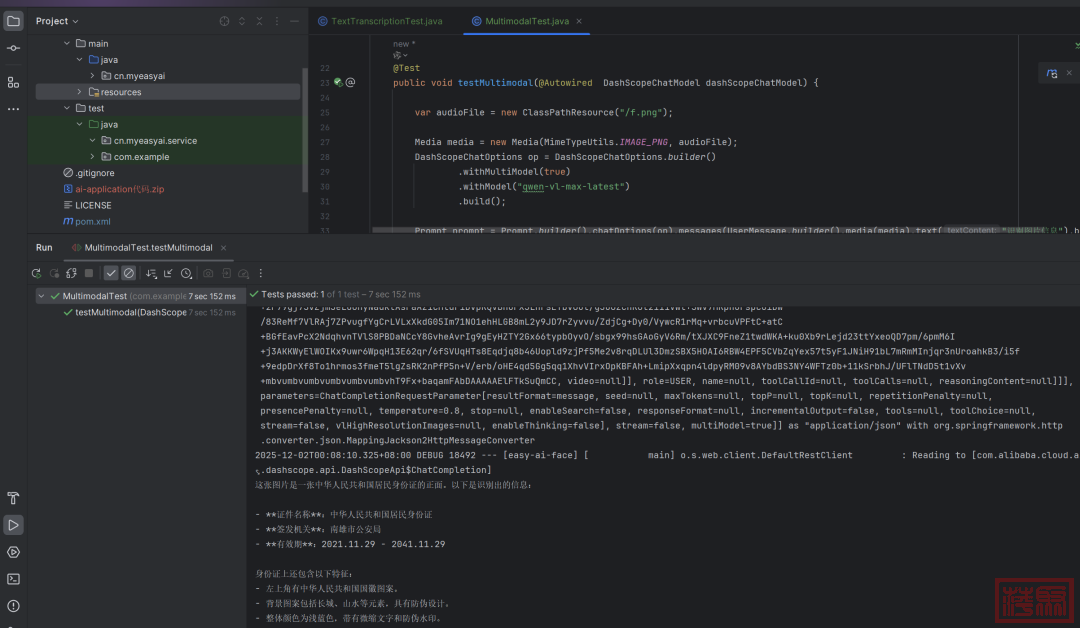
7.多模态

多模态模型:所谓的多模态是指将各种类型的文件丢给大模型,让大模型去理解后,以文本的形式表达文件的内容
package com.example;

import cn.myeasyai.FaceApplication;
import com.alibaba.cloud.ai.dashscope.chat.DashScopeChatModel;
import com.alibaba.cloud.ai.dashscope.chat.DashScopeChatOptions;
import org.junit.jupiter.api.Test;
import org.springframework.ai.chat.messages.UserMessage;
import org.springframework.ai.chat.model.ChatResponse;
import org.springframework.ai.chat.prompt.Prompt;
import org.springframework.ai.content.Media;
import org.springframework.beans.factory.annotation.Autowired;
import org.springframework.boot.test.context.SpringBootTest;
import org.springframework.core.io.ClassPathResource;
import org.springframework.util.MimeTypeUtils;

/**
* 多模态模型:所谓的多模态是指将各种类型的文件丢给大模型,让大模型去理解后,以文本的形式表达文件的内容
*/
@SpringBootTest(classes = FaceApplication.class)
public class MultimodalTest {

    @Test
    public void testMultimodal(@Autowired  DashScopeChatModel dashScopeChatModel) {

        var audioFile = new ClassPathResource("/f.png");

        Media media = new Media(MimeTypeUtils.IMAGE_PNG, audioFile);
        DashScopeChatOptions op = DashScopeChatOptions.builder()
                .withMultiModel(true)
                .withModel("qwen-vl-max-latest")
                .build();

        Prompt prompt = Prompt.builder().chatOptions(op).messages(UserMessage.builder().media(media).text("识别图片信息").build()).build();

        ChatResponse call = dashScopeChatModel.call(prompt);
        System.out.println(call.getResult().getOutput());

    }
}

w6.jpg

8.语音翻译

package com.example;

import cn.myeasyai.FaceApplication;
import com.alibaba.cloud.ai.dashscope.audio.DashScopeAudioTranscriptionModel;
import com.alibaba.cloud.ai.dashscope.audio.DashScopeAudioTranscriptionOptions;
import com.alibaba.cloud.ai.dashscope.audio.DashScopeSpeechSynthesisOptions;
import org.junit.jupiter.api.Test;
import org.springframework.ai.audio.transcription.AudioTranscriptionOptions;
import org.springframework.ai.audio.transcription.AudioTranscriptionPrompt;
import org.springframework.ai.audio.transcription.AudioTranscriptionResponse;
import org.springframework.beans.factory.annotation.Autowired;
import org.springframework.boot.test.context.SpringBootTest;
import org.springframework.core.io.Resource;
import org.springframework.core.io.UrlResource;

import java.io.File;
import java.net.MalformedURLException;

/**
* 语音翻译
*/
@SpringBootTest(classes = FaceApplication.class)
public class TextTranscriptionTest {
    @Test
    public void testAudio2Text(@Autowired  DashScopeAudioTranscriptionModel transcriptionModel) throws MalformedURLException {

        AudioTranscriptionOptions transcriptionOptions = DashScopeAudioTranscriptionOptions.builder()
        .withModel("paraformer-v2")
        .build();

        AudioTranscriptionPrompt audioTranscriptionPrompt = new AudioTranscriptionPrompt(
            new UrlResource("https://help-static-aliyun-doc.aliyuncs.com/file-manage-files/zh-CN/20251117/khzqvb/%E9%BE%99%E5%AE%89%E6%B4%8B.mp3"),
            transcriptionOptions);

        AudioTranscriptionResponse response = transcriptionModel.call(audioTranscriptionPrompt);

        System.out.println(response.getResult().getOutput());

    }
}
w7.jpg

9.文生视频

由于SpringAi与alibaba的兼容还存在一些问题,这里我们直接用alibaba的SDK

①引入SDK
<!--引入原生的阿里巴巴的sdk-->
        <dependency>
            <groupId>com.alibaba</groupId>
            <artifactId>dashscope-sdk-java</artifactId>
            <version>2.20.6</version>
        </dependency>
②编写测试类
package com.example;

import cn.myeasyai.FaceApplication;
import com.alibaba.dashscope.aigc.videosynthesis.VideoSynthesis;
import com.alibaba.dashscope.aigc.videosynthesis.VideoSynthesisParam;
import com.alibaba.dashscope.aigc.videosynthesis.VideoSynthesisResult;
import com.alibaba.dashscope.exception.InputRequiredException;
import com.alibaba.dashscope.exception.NoApiKeyException;
import org.junit.jupiter.api.Test;
import org.springframework.boot.test.context.SpringBootTest;

/**
* 文生视频
*/
@SpringBootTest(classes = FaceApplication.class)
public class TextToVideo {

    @Test
    public  void  textToVideo() throws NoApiKeyException, InputRequiredException {

        VideoSynthesis videoSynthesis = new VideoSynthesis();
        VideoSynthesisParam para = VideoSynthesisParam.builder()
                .model("wanx2.1-t2v-turbo")
                .prompt("A man is playing a game")
                .size("1280*720")
                .apiKey("sk-密钥")
                .build();
        System.out.println("正在生成。。。。。。。");
        VideoSynthesisResult call = videoSynthesis.call(para);
        System.out.println(call.getOutput().getVideoUrl());

    }

}

w8.jpg

生成的视频

w9.jpg
Die von den Nutzern eingestellten Information und Meinungen sind nicht eigene Informationen und Meinungen der DOLC GmbH.
您需要登录后才可以回帖 登录 | 注册 微信登录

本版积分规则

Archiver|手机版|AGB|Impressum|Datenschutzerklärung|萍聚社区-德国热线-德国实用信息网

GMT+1, 2025-12-17 01:39 , Processed in 0.097721 second(s), 31 queries .

Powered by Discuz! X3.5 Licensed

© 2001-2025 Discuz! Team.

快速回复 返回顶部 返回列表